
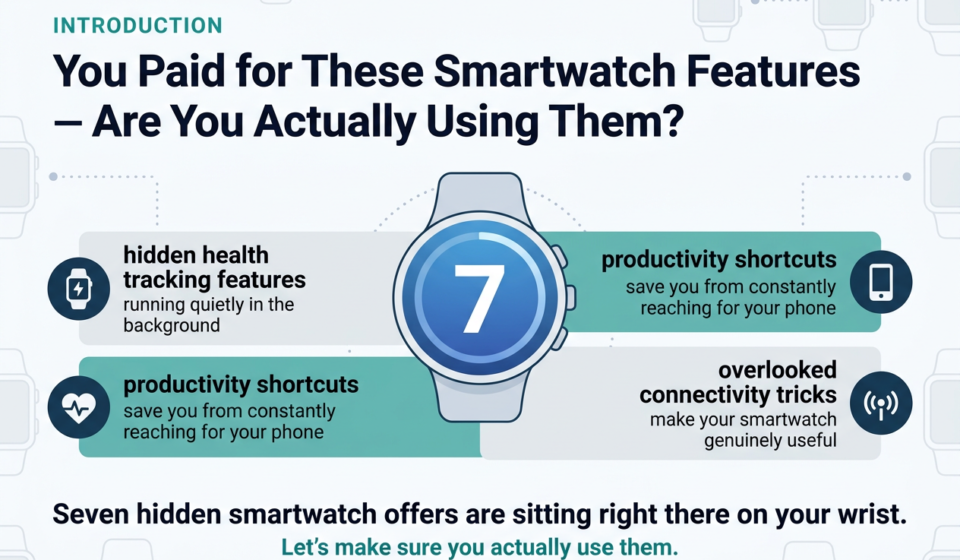

You Paid for These Smartwatch Features — Are You Actually Using Them?
If you bought a smartwatch mostly to check the time and count your steps, you’re leaving a lot on the table. Most shoppers grab a smartwatch, set it up, and never look past the basics. That’s a shame, because the best stuff is buried just a little deeper.
This guide is for everyday smartwatch owners — whether you’re into fitness, you want to stay on top of work, or you just want your wearable to actually earn its price tag.
Here’s what we’re getting into: the hidden health tracking features running quietly in the background while you go about your day, the productivity shortcuts that save you from constantly reaching for your phone, and the overlooked connectivity tricks that make your smartwatch genuinely useful — not just a fancy accessory.
Seven hidden smartwatch offers are sitting right there on your wrist. Let’s make sure you actually use them.
Hidden Health Tracking Features That Work Silently for You
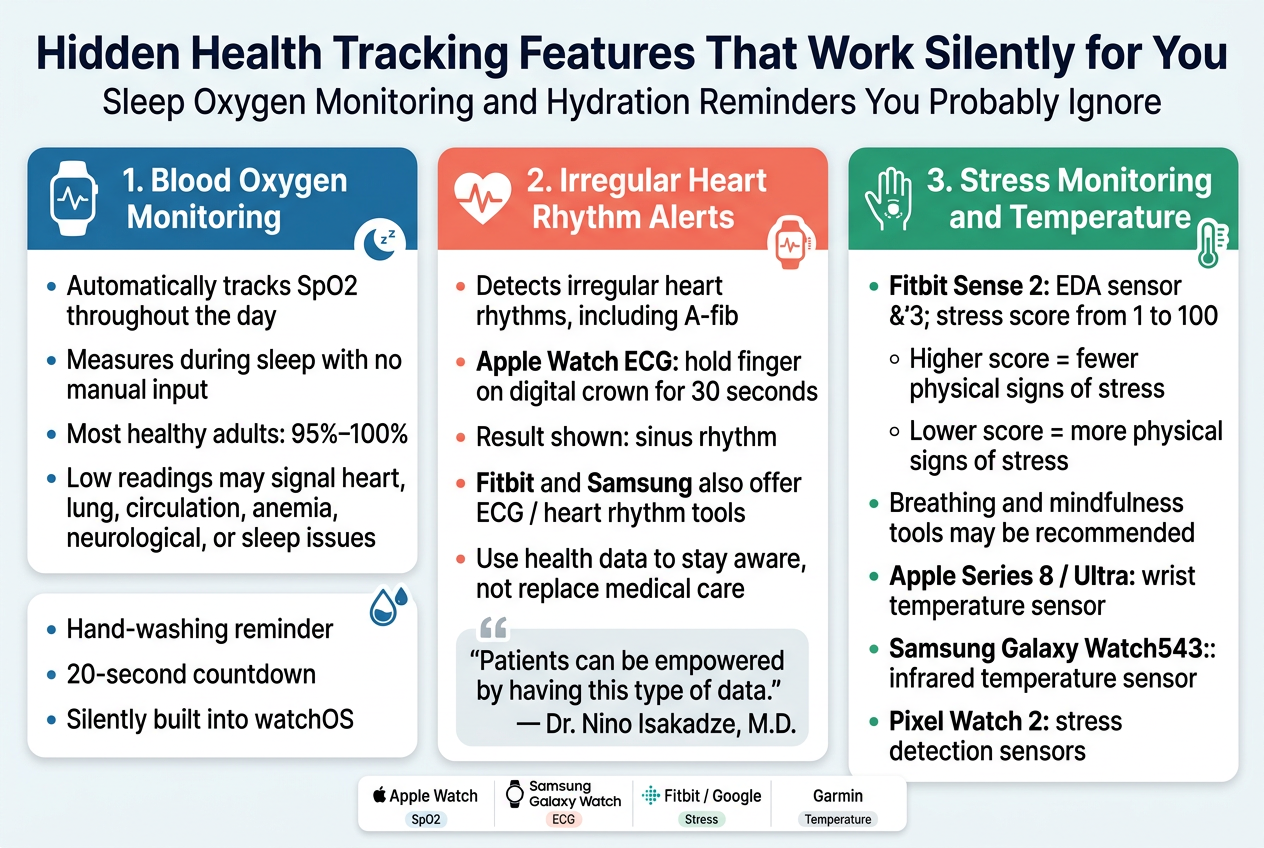
Sleep Oxygen Monitoring and Hydration Reminders You Probably Ignore
Most smartwatch owners glance at step counts and move on, completely missing some of the most powerful health tools sitting quietly on their wrists. Blood oxygen monitoring is one of the most overlooked features available today. Devices from Fitbit/Google, Garmin, Mobvoi, and Samsung all include models capable of measuring blood oxygen levels automatically throughout the day and even while you sleep — no manual input required.
Here is a quick breakdown of how some popular devices handle blood oxygen tracking:
| Brand | Blood Oxygen Tracking Method | When It Measures |
|---|---|---|
| Apple Watch (Series 6–8) | Green, red & infrared LEDs + photodiodes | Throughout the day & during sleep |
| Samsung Galaxy Watch | Optical sensor | Continuous & on-demand |
| Fitbit/Google | Optical sensor via PPG | Passively during rest & sleep |
| Garmin | Pulse ox sensor | During sleep & spot checks |
According to Dr. Leslie Saxon, M.D., professor of medicine and executive director at the Center for Body Computing at the University of Southern California, a low blood oxygen reading can be an early indicator of circulatory, heart, or lung function issues — including anemia, neurological problems, or sleep disorders. Most healthy adults maintain blood oxygen levels between 95% and 100%, so consistent readings below this range deserve medical attention.
Beyond oxygen, many smartwatches also include hand-washing reminders — a feature Apple quietly built into watchOS — which triggers an automatic 20-second countdown timer to ensure proper hygiene. These reminders operate silently in the background, making them easy to overlook entirely during setup.
Irregular Heart Rhythm Alerts That Could Save Your Life
With this in mind, one of the most medically significant hidden features on modern smartwatches is the ability to detect irregular heart rhythms, particularly atrial fibrillation (A-fib) — a condition that is a major risk factor for blood clots and stroke.
Apple was among the first to bring this capability to consumers. In 2018, the Apple Watch Series 4 introduced an FDA-cleared ECG (electrocardiogram) app that detects A-fib. The process is straightforward: launch the app, hold your finger against the digital crown for 30 seconds, and the watch reads electrical signals through electrodes built into the back crystal and digital crown. A “sinus rhythm” result means a normal heartbeat was detected.
Importantly, the FDA announced that Apple’s A-fib history feature was the first to qualify under the agency’s Medical Device Development Tools (MDDT) program, meaning it can be used in clinical studies to assess how often a patient was in A-fib and evaluate treatment effectiveness.
Fitbit also received FDA clearance for its EKG app, available on the Fitbit Sense 2 and Charge 6, as well as Pixel Watch models. Fitbit’s system works differently — its photoplethysmography (PPG) algorithm passively monitors your heart rhythm in the background while you’re still or asleep, making it even more hands-off than Apple’s approach.
Samsung rounds out the trio with its own FDA-cleared heart-monitoring ECG app available on the Galaxy Watch6 (starting at $299.99), as well as older models like the Galaxy Watch4 and Galaxy Watch5.
As Dr. Nino Isakadze, M.D., cardiologist at Johns Hopkins Hospital, puts it:
“This is a new era where we have an opportunity to reach the patients outside the walls of the hospital. Patients can be empowered by having this type of data and be able to track their progress and be more aware of their health overall.”
She also emphasizes that regardless of what the numbers show, if you are not feeling well, seeking medical care remains critical. These tools are designed to empower — not replace — professional medical advice.
Stress Monitoring Tools Hidden Inside Your Smartwatch
Previously, stress monitoring was considered a luxury feature reserved for high-end wellness devices. Now, it is quietly embedded in several mainstream smartwatches — and most users never activate it.
Fitbit added an electrodermal activity (EDA) sensor to its Fitbit Sense and Fitbit Sense 2 watches. When you place your palm over the face of the device, the sensor detects subtle electrical changes in the sweat level of your skin. Combined with heart rate, sleep, and activity data, Fitbit calculates a stress management score from 1 to 100:
- Higher score → fewer physical signs of stress
- Lower score → more physical signs of stress
Based on this data, Fitbit may recommend breathing exercises and mindfulness tools to help manage stress levels. However, note that after a free trial period, deeper metric analysis requires a Fitbit Premium subscription, priced at $9.99/month or $79.99/year.
Google’s Pixel Watch 2 includes similar sensors capable of detecting stress signals, building on the Fitbit technology now integrated into Google’s ecosystem.
Beyond stress, temperature sensing adds another hidden layer of health insight. The Fitbit Sense detects variations in skin temperature. Apple added wrist temperature sensors starting with the Series 8 and on the Apple Watch Ultra ($799). Samsung introduced an infrared temperature sensor on the Galaxy Watch5 and later models.
Here is a side-by-side comparison of stress and temperature monitoring across major brands:
| Device | Stress Monitoring Method | Skin Temperature Sensor |
|---|---|---|
| Fitbit Sense 2 | EDA sensor + stress score (1–100) | ✅ Yes |
| Google Pixel Watch 2 | Stress detection sensors | ✅ Yes (via Fitbit integration) |
| Apple Watch Series 8/Ultra | Heart rate & sleep-based insights | ✅ Yes (wrist temperature) |
| Samsung Galaxy Watch5+ | Heart rate variability analysis | ✅ Yes (infrared) |
These tools work silently, collecting data around the clock without requiring you to do anything beyond wearing your watch. The key is knowing these features exist and taking the time to review the data they surface. Many users never even open the stress or recovery sections of their companion apps — and that is where some of the most actionable health insights are hiding.
Smartwatch Productivity Hacks Most Users Never Discover
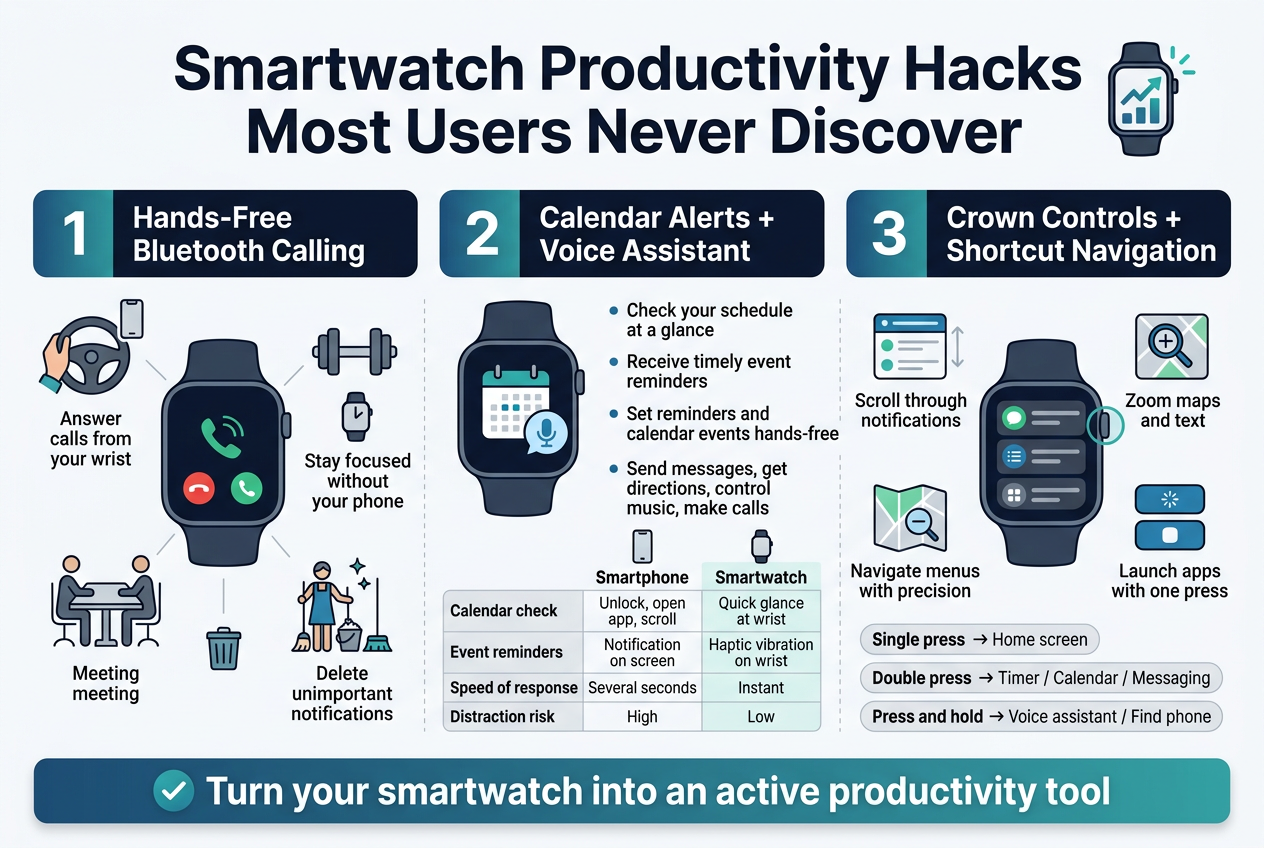
A. Hands-Free Bluetooth Calling to Stay Focused Without Your Phone
One of the most underrated productivity features built into modern smartwatches is the ability to handle phone calls directly from your wrist. Most shoppers assume their smartwatch is only useful for counting steps or tracking heart rate, but the hands-free Bluetooth calling capability is a genuine game-changer for anyone who needs to stay focused throughout the day.
When your phone is charging across the room, tucked in your bag during a commute, or simply out of reach during a workout, your smartwatch keeps you connected without forcing you to break your momentum. You can answer incoming calls, speak through the watch’s built-in microphone, and carry on a full conversation without ever touching your phone.
This feature is especially practical in the following scenarios:
- While driving — Keep both hands on the wheel and your eyes on the road while still taking important calls
- During a workout — Respond to calls without stopping to dig through a gym bag
- In a meeting — Quickly glance at who is calling and decide whether to answer or dismiss discreetly
- When multitasking at home — Handle a call while cooking, cleaning, or managing other household tasks
Beyond just answering calls, this connectivity means you can also delete unimportant notifications as they arrive, preventing a backlog of missed messages and cluttered inboxes that would otherwise demand attention later on your laptop or smartphone. The result is a leaner, more focused communication style that keeps interruptions to a minimum without sacrificing your availability.
B. Calendar Alerts and Voice Assistant Access to Cut Daily Distractions
With hands-free calling already working in your favor, now that we have covered that connectivity angle, it is worth turning attention to two features that work together to dramatically reduce daily mental clutter — calendar alerts and voice assistant access.
Calendar Alerts on Your Wrist
Most smartwatch users connect their devices to their phones but never bother activating calendar sync. This is a significant missed opportunity. Your smartwatch’s built-in calendar functionality allows you to:
- Check your schedule at a glance without unlocking a phone
- Receive timely event notifications so last-minute surprises become a thing of the past
- Review event locations directly from your wrist
- Respond to event invites without reaching for your device
Whether it is a lunch appointment, an afternoon meeting, or a medication reminder, your watch taps your wrist before you even think to check the time. This keeps you perpetually prepared rather than scrambling to catch up.
| Feature | Smartphone | Smartwatch |
|---|---|---|
| Calendar check | Unlock, open app, scroll | Quick glance at wrist |
| Event reminders | Notification on screen | Haptic vibration on wrist |
| Speed of response | Several seconds | Instant |
| Distraction risk | High (other apps visible) | Low (single focused alert) |
Voice Assistant Access for Hands-Free Task Management
When your schedule is packed and your hands are occupied, the voice assistant feature on your smartwatch becomes an indispensable tool. On supported models, activating Google Assistant or Bixby with a simple press of the side button — or by saying the appropriate hotword — lets you:
- Set reminders on the go without stopping what you are doing
- Create calendar events while driving or rushing between tasks
- Send messages without typing a single word
- Get directions delivered straight to your wrist
- Control music playback during workouts or work sessions
- Make calls entirely hands-free
The practical benefit here is significant. Rather than pulling out your phone, unlocking it, navigating to the right app, and typing — all of which invite distractions from other notifications — you speak a single command and return immediately to your task. This eliminates decision fatigue and keeps your attention where it belongs.
C. Smoother App Navigation With Functional Crown Controls
Previously, navigating a smartwatch meant tapping through tiny icons on a small screen, which often led to frustration and accidental taps. With this in mind, the physical crown control found on many modern smartwatches addresses exactly that pain point — yet most users treat it as nothing more than a button to press for returning to the home screen.
The crown is far more functional than it appears. Here is what it can do when properly utilized:
- Scroll through notifications without smudging or obscuring the display with your finger
- Zoom in and out on maps or text for clearer reading
- Navigate menus with precision, reducing the number of screen taps needed
- Launch frequently used apps or shortcuts with a single press or press-and-hold, depending on your watch settings
Beyond the crown, assigning shortcuts to physical buttons or configuring gesture-based controls speeds up navigation across the board. Most smartwatch settings panels allow users to customize which app or feature launches with a double-press or long-press of a button — a small adjustment that saves meaningful time across hundreds of interactions throughout the week.
To maximize this, consider assigning your most frequently used features to these controls:
- Single press → Return to home screen or clock face
- Double press → Launch your most-used app (timer, calendar, or messaging)
- Press and hold → Activate voice assistant or find-phone feature
Taken together, hands-free calling, calendar alerts, voice assistant access, and refined crown navigation transform a smartwatch from a passive notification mirror into an active productivity instrument. These are not advanced features reserved for tech enthusiasts — they are built into most modern smartwatches and simply waiting to be switched on and put to work.
Overlooked Connectivity Features That Add Real Convenience
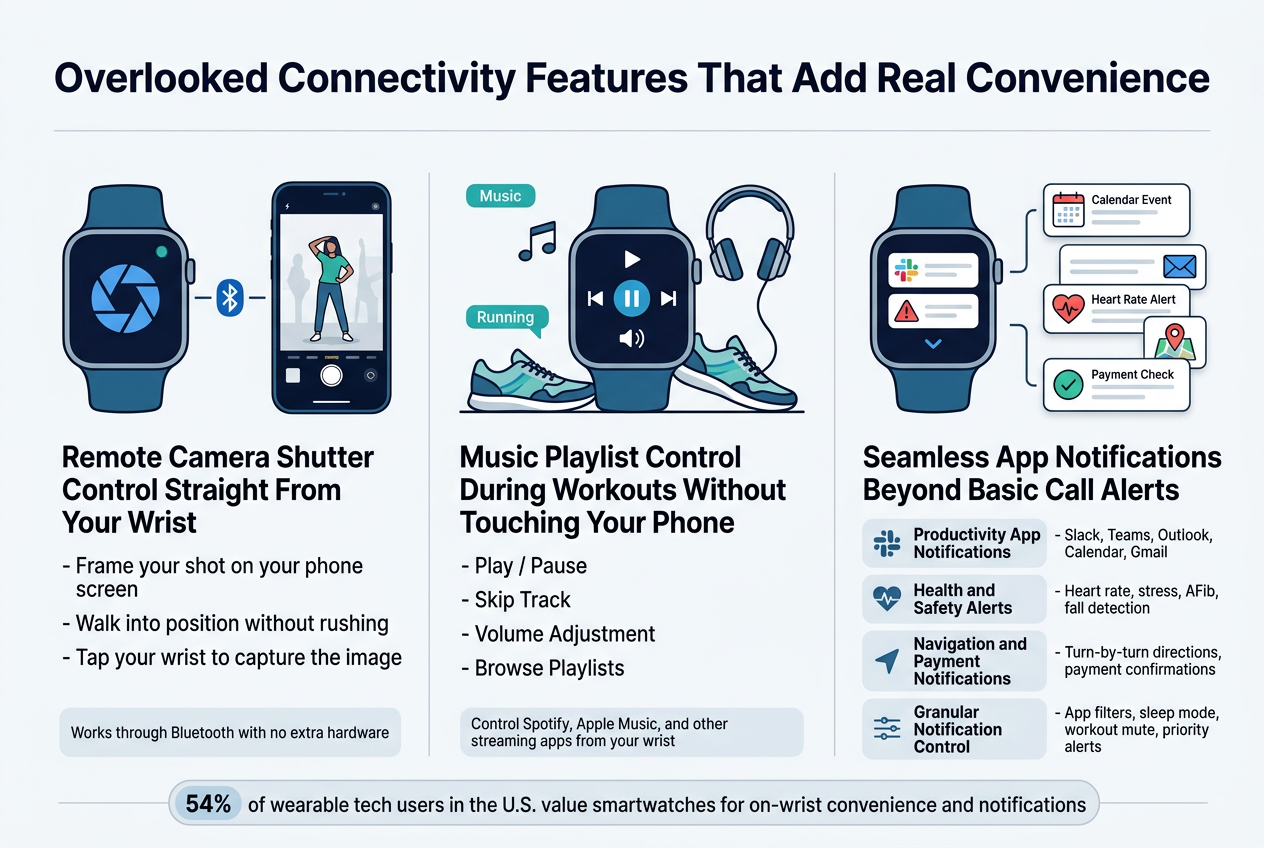
Remote Camera Shutter Control Straight From Your Wrist
One of the most underestimated connectivity perks hiding inside your smartwatch is the ability to trigger your smartphone camera remotely. Most shoppers glance past this feature during setup, yet it solves a genuinely frustrating everyday problem — taking group photos or solo shots without asking a stranger for help or propping your phone against a precarious stack of objects.
With this feature enabled, your smartwatch acts as a wireless shutter button. You can:
- Frame your shot on your phone screen
- Walk into position without rushing before a timer expires
- Tap your wrist to capture the image at exactly the right moment
This is particularly useful for content creators, travelers, and anyone who wants clean, well-composed photos without a tripod or a second person. The connection runs through your watch’s Bluetooth link to your paired phone, meaning no additional hardware or apps are typically required beyond what already comes installed.
Smartwatches like the Apple Watch and Samsung Galaxy Watch models support this function natively through their companion camera apps. The seamless integration between wrist and phone that these devices already provide makes remote shutter control a natural extension of their connectivity design. Given that about 54% of wearable tech users in the U.S. value smartwatches for on-wrist convenience, remote camera control fits squarely into that demand for reducing the need to physically handle your phone.
Music Playlist Control During Workouts Without Touching Your Phone
Now that we have covered camera control, with this in mind, next we’ll see how your smartwatch quietly transforms into a full music command center — especially during workouts where pulling out your phone is awkward, sweaty, or simply not practical.
Most smartwatch users know they can see incoming call alerts on their wrist, but far fewer realize they can control their entire music experience without ever reaching for their phone. This is one of the most relevant connectivity features for fitness-focused users, and it pairs directly with what reference data confirms: sport tracking and active lifestyle support rank among the top expectations for modern smartwatch buyers.
Here is what wrist-based music control typically allows you to do:
| Control Function | How It Helps During a Workout |
|---|---|
| Play / Pause | Stop music instantly without breaking stride |
| Skip Track | Move past a slow song mid-run without slowing down |
| Volume Adjustment | Fine-tune audio levels without touching earbuds or phone |
| Browse Playlists | Switch between workout playlists on the fly |
Smartwatches that support platforms like Spotify, Apple Music, and other streaming services let you manage playback directly from your wrist. This connectivity feature works over Bluetooth, keeping your phone safely tucked in your armband, bag, or even at home if your watch supports independent LTE streaming.
For serious athletes and casual gym-goers alike, the ability to stay in the zone without phone interruptions is a genuine quality-of-life upgrade. Brands that build seamless third-party app sync — including music apps — into their smartwatches are directly addressing what buyers want: a device that keeps up with their active day without creating friction.
Seamless App Notifications Beyond Basic Call Alerts
Previously, I’ve touched on how music control and camera triggering represent underused wrist connectivity — but perhaps the most broadly impactful overlooked feature is the depth of app notifications your smartwatch is already capable of delivering.
Most new smartwatch owners configure their device to show call alerts and maybe text messages, then stop there. This barely scratches the surface of what modern smartwatches offer through their notification systems.
According to Statista, approximately 54% of wearable tech users in the U.S. value smartwatches primarily for on-wrist notifications — yet a large portion of those users never customize their notification settings beyond the defaults.
Here is a breakdown of the notification categories that go well beyond basic call alerts:
Productivity App Notifications
- Slack, Microsoft Teams, and Outlook alerts let professionals stay on top of workplace communications without unlocking their phone
- Google Calendar and Apple Calendar push real-time meeting notifications and schedule updates directly to your wrist
- Gmail and email clients deliver actionable alerts, often allowing quick-reply responses without pulling out a device
Health and Safety Alerts
- Abnormal heart rate warnings
- High stress level notifications
- AFib detection alerts (available on FDA-cleared devices like Apple Watch Series 9 and Samsung Galaxy Watch 6)
- Fall detection alerts that can automatically notify emergency contacts
Navigation and Payment Notifications
- Turn-by-turn navigation prompts from apps like Google Maps deliver haptic nudges and on-screen directions, keeping users hands-free
- Real-time payment confirmations from Apple Pay and Google Pay notify users immediately after each transaction, helping flag unauthorized charges quickly
Granular Notification Control
What separates a smartwatch that truly adds convenience from one that simply buzzes constantly is granular notification management. Leading devices like the Samsung Galaxy Watch 6 offer:
- Custom rules for which apps can send alerts
- Auto-muting notifications during sleep or active workout sessions
- Priority filtering so only time-sensitive alerts get through during focus hours
This level of control directly reflects what smartwatch buyers want most: actionable, relevant, and non-intrusive alerts that reduce the need to check a smartphone screen repeatedly throughout the day. When your smartwatch delivers the right notification at precisely the right moment — whether it’s a meeting reminder, a health warning, or a payment confirmation — it stops feeling like a gadget and starts functioning as a genuinely indispensable daily tool.
Advanced Smartwatch Settings Worth Enabling Right Now
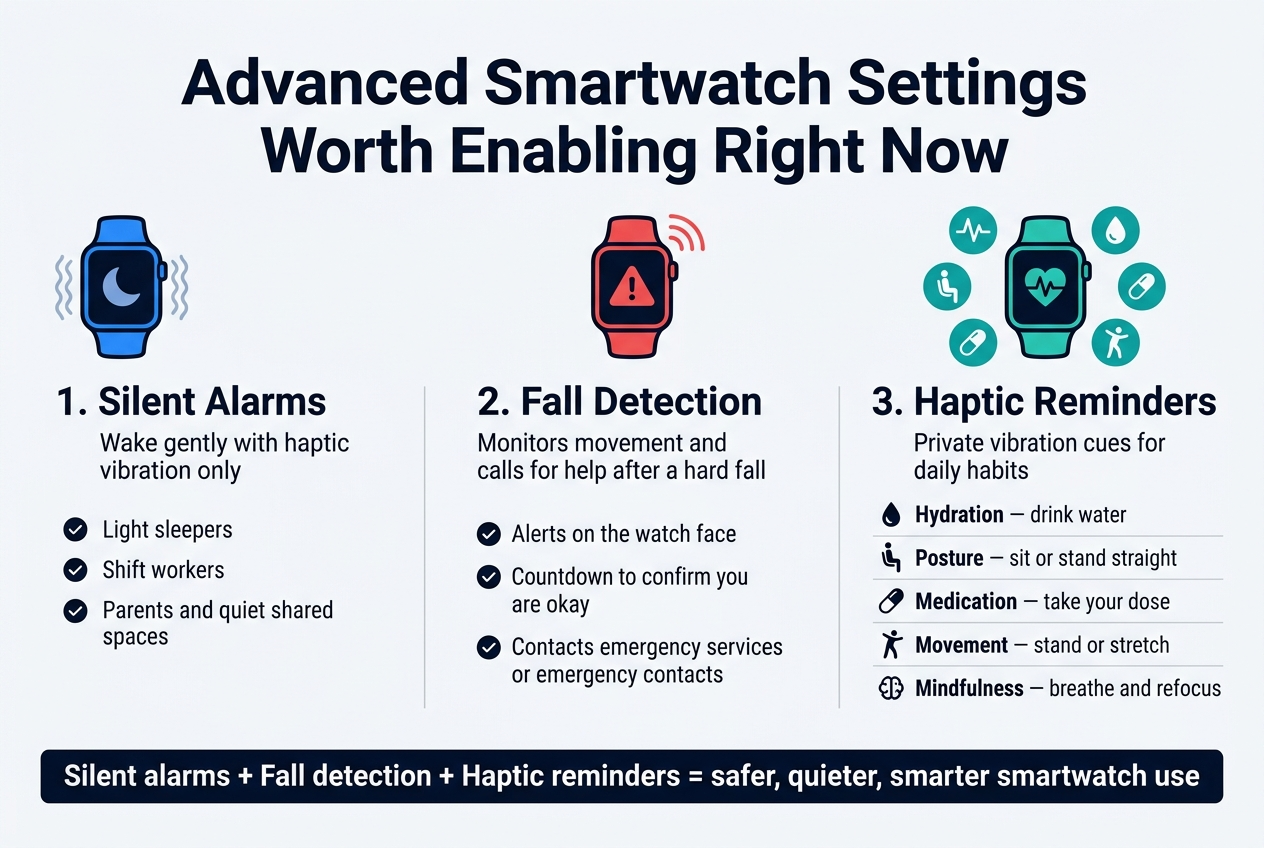
Silent Alarms That Wake You Gently Without Disturbing Others
One of the most underrated settings hiding inside your smartwatch is the silent alarm, which relies entirely on haptic vibration rather than a blaring sound. Most shoppers buy a smartwatch primarily for fitness tracking or notifications, never realizing that the wrist-based alarm function can completely replace the loud morning alarm that wakes everyone in the room except the person who actually needs to get up.
The way it works is straightforward. Instead of playing an audio alert, the smartwatch vibrates against your wrist at the set time, delivering a gentle but effective nudge directly to you. This is especially valuable for:
- Light sleepers sharing a bed who do not want to disturb a partner
- Shift workers with unconventional wake-up times
- Parents who need to rise before children
- Anyone in a quiet sleeping environment such as a dorm room or shared space
To set this up, navigate to your smartwatch’s alarm settings and choose the vibration-only or silent mode option. The exact path differs across brands, but it is typically found within the Clock or Alarms section of your watch’s app menu or directly through the device settings. Once enabled, you will wonder how you ever managed without it.
Fall Detection for Emergency Safety You Did Not Know Existed
Now that we have covered silent alarms, it is worth turning attention to one of the most genuinely life-saving features that the vast majority of smartwatch users never think to enable: fall detection. This feature works silently in the background, constantly monitoring your movement patterns through the watch’s built-in sensors.
When a sudden, hard fall is detected, the smartwatch immediately responds by:
- Triggering an alert on the watch face
- Starting a countdown timer giving you the chance to confirm you are okay
- Automatically contacting emergency services or pre-set emergency contacts if you do not respond within the countdown window
This is a setting that delivers exceptional value not just for older adults or those with medical conditions, but for anyone who exercises alone, hikes solo, or works in environments where a fall could happen unexpectedly. The notification system is designed to respect user control — if you are fine, you dismiss the alert and go about your day. But in a genuine emergency, this silent background feature can make the difference between help arriving quickly and no help arriving at all.
To enable fall detection, head into your smartwatch’s Settings, look for a Safety & Emergency or Health & Safety section, and toggle the feature on. Some devices also let you configure who gets notified and by what method, giving you additional control over your emergency response setup.
Haptic Feedback Reminders for Smarter Daily Habit Building
With this in mind, next, we’ll see how haptic feedback reminders — another deeply overlooked smartwatch setting — can quietly transform how you build and maintain daily habits. While most people associate their smartwatch’s vibration motor only with incoming notifications, this same hardware serves a far more purposeful role when used intentionally for habit reminders.
Haptic reminders work by sending scheduled vibration pulses to your wrist at intervals or times you define, prompting you to take specific actions throughout the day. Here are some of the most practical uses:
| Habit Goal | How Haptic Reminders Help |
|---|---|
| Hydration | Nudge every hour to drink water |
| Posture correction | Periodic reminder to sit or stand straight |
| Medication timing | Precise vibration alert at scheduled dose times |
| Movement breaks | Reminder to stand or stretch after prolonged sitting |
| Mindfulness pauses | Prompt for a brief breathing or focus exercise |
Previously, building these kinds of micro-habits required external apps or sticky notes. Your smartwatch consolidates all of this into a discreet, private cue delivered directly to your wrist without pulling out your phone or creating noise that disturbs those around you.
To access these settings, explore your smartwatch’s Notifications or Health section, where you will typically find options for reminders to move, breathe, or complete other recurring wellness actions. Some brands allow deep customization through their companion smartphone app, which provides a more detailed interface for setting up multiple customized reminder types.
The combination of all three of these settings — silent alarms, fall detection, and haptic reminders — creates a smartwatch experience that actively works for your safety, comfort, and personal growth around the clock.
Sports and Fitness Modes Most Shoppers Forget to Use
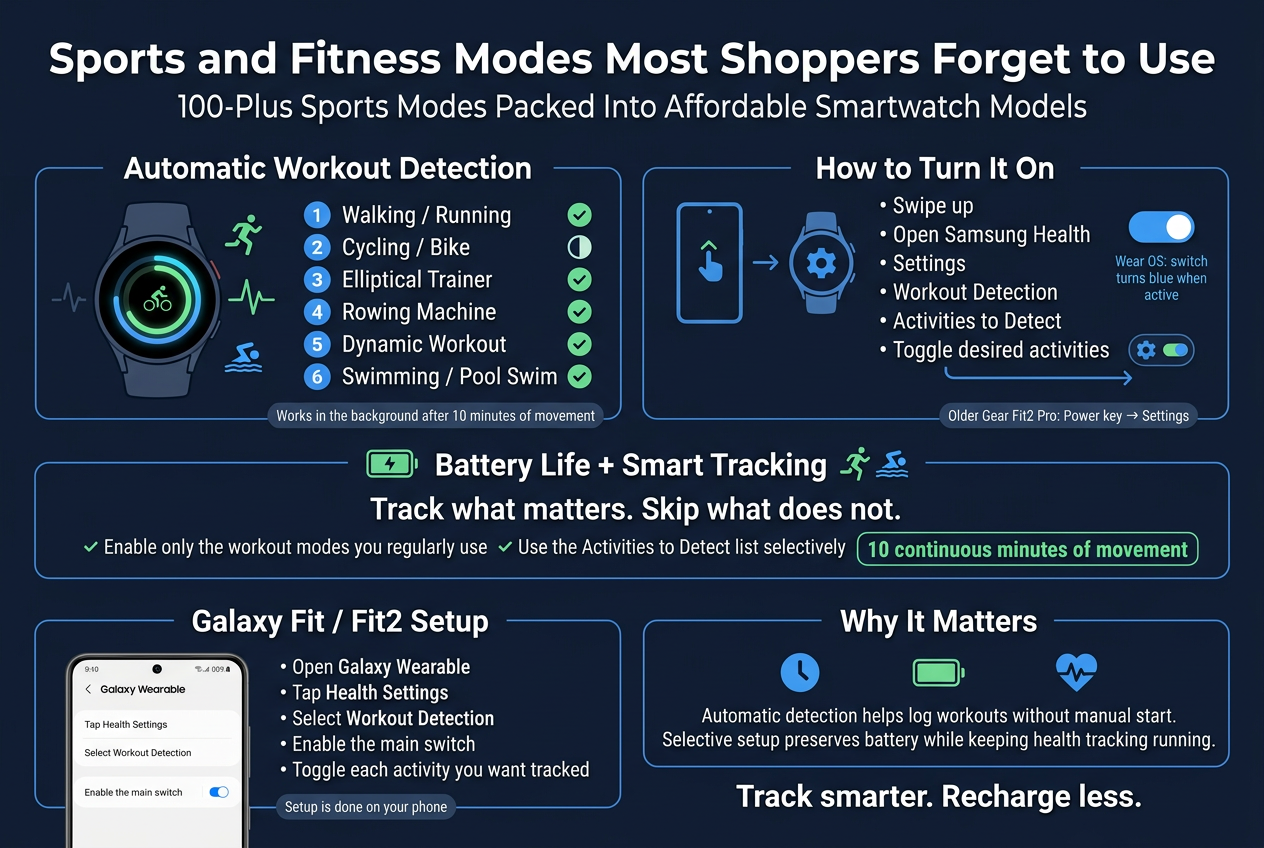
100-Plus Sports Modes Packed Into Affordable Smartwatch Models
One of the most consistently overlooked advantages of modern smartwatches is the sheer volume of sports and fitness modes built directly into the device — many of which shoppers never explore after their initial setup. Brands like Samsung have packed their smartwatch lineup with automatic workout detection capabilities that actively monitor your activity without requiring you to manually start a session every single time.
Here is a breakdown of the key workout activities that automatic detection can identify on compatible Samsung smartwatches:
| Sports Mode | Auto-Detection Available |
|---|---|
| Walking / Running | Yes |
| Cycling / Bike | Limited (varies by model) |
| Elliptical Trainer | Yes |
| Rowing Machine | Yes |
| Dynamic Workout (high-movement) | Yes |
| Swimming / Pool Swim | Yes |
What makes this particularly powerful is that the watch works silently in the background. You simply need to work out for at least 10 minutes before the automatic workout detection feature kicks in and begins logging your data. Once enabled, the feature can be configured through the Samsung Health app directly on your watch by navigating to:
- Swipe up on your watch face
- Open Samsung Health
- Navigate to Settings
- Tap Workout Detection or Activities to Detect
- Toggle the switch next to each desired activity
For Galaxy watches running Wear OS, the switch will appear blue when active, making it easy to confirm the feature is enabled. For older models like the Gear Fit2 Pro, the path runs through the Power key and then directly into Settings.
It is also worth noting that even if a specific mode — such as cycling on the Galaxy Watch 5 or Galaxy Watch 4 — is not available for automatic detection, it can still be added to the Multi-workouts tile for manual activation. This ensures you never miss out on tracking a session just because a particular workout falls outside the auto-detection list.
For users with a Galaxy Fit or Fit2, the setup process is handled through the Galaxy Wearable app on your phone rather than the watch itself:
- Open Galaxy Wearable on your smartphone
- Tap Health Settings
- Select Workout Detection
- Enable the main switch
- Toggle on each individual activity you want tracked
Now that we have covered the broad range of sports modes and how to activate them, with this in mind, next, we’ll look at how battery life features play a critical role in keeping all of this health tracking running continuously.
Long Battery Life Features That Keep Health Tracking Running Nonstop
Previously, I’ve touched on how automatic workout detection silently logs your fitness data, but none of that matters if your smartwatch runs out of power before the end of the day. Battery performance is one of the most underrated considerations when evaluating smartwatch value — and many shoppers overlook features specifically designed to extend runtime while keeping health tracking active.
Automatic workout detection, when properly configured, actually supports smarter battery use. Rather than running a full tracking session manually from start to finish at all times, the watch only activates intensive data logging once it recognizes a qualifying workout activity — specifically, after 10 continuous minutes of movement that matches a selected activity type. This threshold acts as a natural battery-saving filter, preventing unnecessary drain from brief bursts of activity that do not constitute a real workout session.
Here are key practices that help maintain continuous health tracking without constant recharging:
- Enable only the workout modes you regularly use — having fewer activities set to auto-detect reduces the processing load on the watch
- Use the Activities to Detect list selectively — toggle on swimming, running, or elliptical only if those are part of your regular routine
- Keep alerts enabled — this ensures the watch notifies you when a workout is detected rather than running background processes unnecessarily
The Alerts switch, found within the Workout Detection settings in Samsung Health, is particularly important. Keeping it turned on means the watch surfaces the detection actively rather than passively, helping you confirm sessions are being recorded without you having to dig into the app manually.
For users with entry-level models like the Galaxy Fit or Fit2, the battery-to-tracking balance is managed through the Galaxy Wearable app, where health settings can be fine-tuned to match your lifestyle without overloading the device’s power capacity.
The combination of selective sports mode activation and smart detection thresholds means your smartwatch can remain a reliable fitness partner throughout the day — tracking what matters, skipping what does not, and preserving battery life in the process.
Smart Offers and Features That Deliver the Best Value
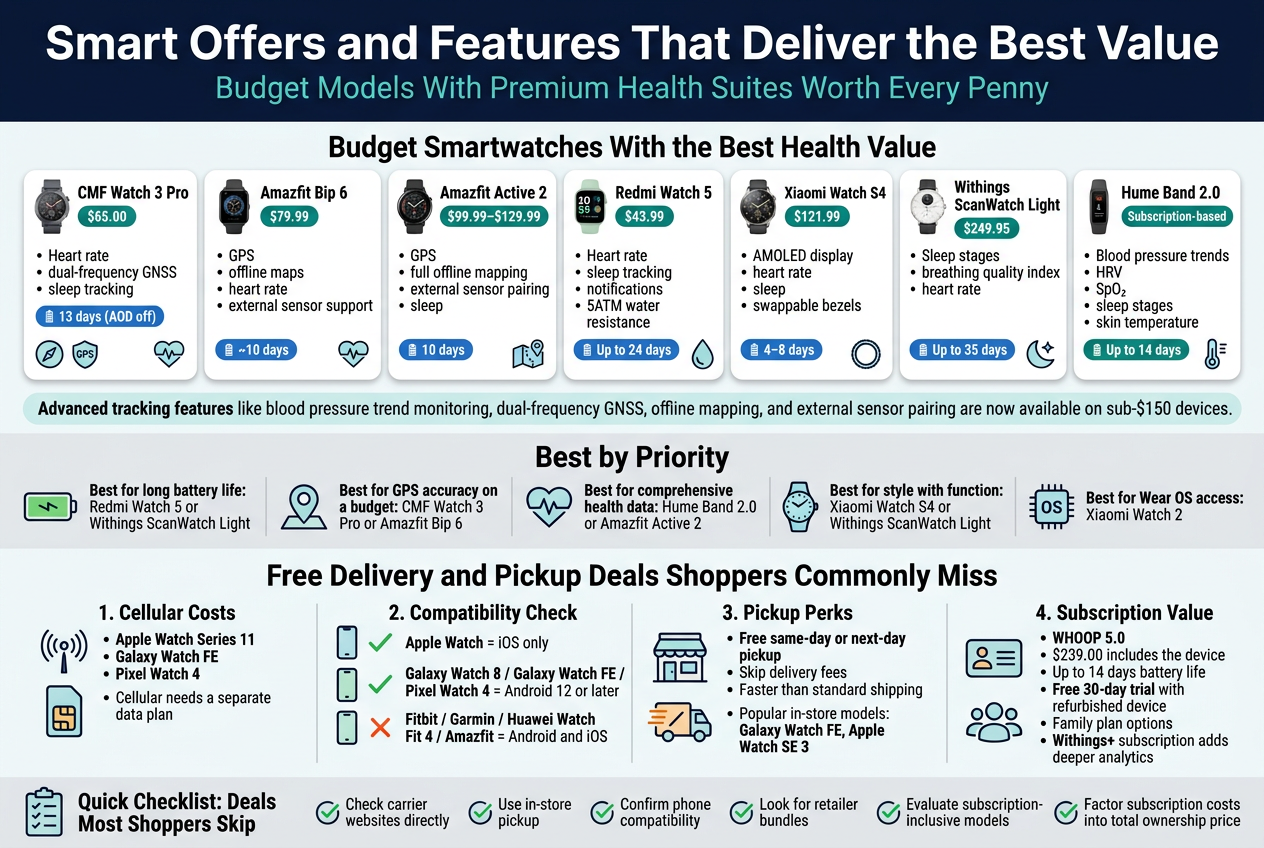
Budget Models With Premium Health Suites Worth Every Penny
Now that we have covered the fitness modes and productivity hacks most users overlook, it is time to zero in on where your money can go the furthest. The smartwatch market in 2026 has shifted dramatically, and budget-friendly devices are no longer stripped-down compromises — many now rival mid-range models in health tracking depth.
Here is a breakdown of the standout budget smartwatches that deliver serious health suite value:
| Smartwatch | Price | Key Health Features | Battery Life |
|---|---|---|---|
| CMF Watch 3 Pro | $65.00 | Heart rate, dual-frequency GNSS, sleep tracking | 13 days (AOD off) |
| Amazfit Bip 6 | $79.99 | GPS, offline maps, heart rate, external sensor support | ~10 days |
| Amazfit Active 2 | $99.99–$129.99 | GPS, full offline mapping, external sensor pairing, sleep | 10 days |
| Redmi Watch 5 | $43.99 | Heart rate, sleep tracking, notifications, 5ATM water resistance | Up to 24 days |
| Xiaomi Watch S4 | $121.99 | AMOLED display, heart rate, sleep, swappable bezels | 4–8 days |
| Withings ScanWatch Light | $249.95 | Sleep stages, breathing quality index, heart rate | Up to 35 days |
| Hume Band 2.0 | Subscription-based | Blood pressure trends, HRV, SpO₂, sleep stages, skin temperature | Up to 14 days |
What Budget Really Gets You Now
Previously, spending under $100 on a smartwatch meant accepting severely limited health tracking. That is no longer the case. The Amazfit Active 2 at $99.99–$129.99 includes full offline mapping and external sensor pairing — features that were once exclusive to watches costing three or four times as much. For casual athletes or everyday users, this means access to genuinely useful data without a premium price tag.
The CMF Watch 3 Pro at just $65.00 sets a new bar for budget aesthetics and functionality. Its dual-frequency GNSS tracking performed on par with watches three times the price during testing, and the 13-day battery life (with AOD disabled) is difficult to beat at this price point. Heart rate accuracy is solid for casual workouts, though serious interval runners may notice some lag.
For users focused on recovery and long-term wellness, the Hume Band 2.0 stands out with its blood pressure trend tracking, HRV monitoring, SpO₂, sleep stages, respiratory rate, skin temperature, and activity metrics — all packed into a slim, screenless design with up to 14 days of battery life. It is considered the most balanced wearable for the money by independent testers.
At the elegance end of the budget spectrum, the Withings ScanWatch Light at $249.95 offers up to 35 days of battery on a single charge, alongside sleep stage tracking, breathing quality index, and heart rate monitoring — all housed in an analog-style design that does not look like a fitness tracker at first glance.
Breaking Down the Value by Priority
- Best for long battery life: Redmi Watch 5 (up to 24 days) or Withings ScanWatch Light (up to 35 days)
- Best for GPS accuracy on a budget: CMF Watch 3 Pro or Amazfit Bip 6
- Best for comprehensive health data: Hume Band 2.0 or Amazfit Active 2
- Best for style with function: Xiaomi Watch S4 or Withings ScanWatch Light
- Best for Wear OS access: Xiaomi Watch 2 (cheapest Wear OS device available)
Advanced tracking features like blood pressure trend monitoring, dual-frequency GNSS, offline mapping, and external sensor pairing are now trickling down to sub-$150 devices. Identifying which metrics matter most to you before purchasing is the most practical way to extract maximum value from any budget model.
Free Delivery and Pickup Deals Shoppers Commonly Miss
With this in mind, next, we will look at another layer of value that most shoppers completely overlook — not just what the smartwatch offers, but how the purchase itself can save you money before you even open the box.
Cellular and Connectivity Options That Affect Total Cost
One frequently missed factor is the cellular option available on select models. Smartwatches like the Apple Watch Series 11, Galaxy Watch FE, and Pixel Watch 4 support cellular connectivity, but this requires a separate data plan through your carrier. Shoppers who miss this detail often face unexpected monthly costs after purchase.
However, carriers and retailers regularly bundle free delivery promotions, trade-in credits, and activation bonuses with these cellular models. These deals are time-sensitive and not always prominently advertised, meaning shoppers who check carrier websites directly — rather than retail aggregators — often find the best offers.
Compatibility Considerations That Save Return Shipping Costs
Another hidden cost shoppers overlook is buying a smartwatch incompatible with their phone, then having to return it. Compatibility rules are strict:
- Apple Watch works exclusively with iOS devices
- Galaxy Watch 8, Galaxy Watch FE, Pixel Watch 4 require Android 12 or later
- Fitbit, Garmin, Huawei Watch Fit 4, and Amazfit models generally support both Android and iOS
Confirming compatibility before ordering eliminates return shipping fees and the hassle of repackaging — a simple check that saves both time and money.
Retailer-Specific Pickup and Delivery Perks
Many major retailers offer free same-day or next-day pickup for smartwatches, which is faster than standard shipping and carries no delivery fee. Shoppers who default to standard delivery often wait longer and miss out on same-day convenience that costs nothing extra. Models like the Galaxy Watch FE and entry-level options like the Apple Watch SE 3 are frequently stocked in physical retail locations precisely because of their popularity, making in-store pickup an easily accessible option.
Additionally, entry-level models — specifically the Apple Watch SE 3 and Galaxy Watch FE — are positioned as the more affordable end of their respective ecosystems, and retailers frequently use these models as promotional anchors, attaching free accessories, gift cards, or extended warranty bundles that are easy to overlook during a standard online checkout.
Subscription-Inclusive Models That Front-Load Value
The WHOOP 5.0 operates on a membership-based model priced at $239.00, which includes the device itself. While this initially appears more expensive than a straightforward purchase, it includes up to 14 days of battery life, a free 30-day trial with a refurbished device, and family plan options — all of which reduce the per-user cost significantly when shared. Shoppers who evaluate only the sticker price miss these built-in value layers entirely.
Similarly, Withings models with advanced features require a Withings+ subscription for deeper analytics, which is a recurring cost worth factoring into the total price of ownership before committing to a purchase.
Quick Checklist: Deals Most Shoppers Skip
- ✅ Check carrier websites directly for cellular model bundles (Apple Watch Series 11, Galaxy Watch FE, Pixel Watch 4)
- ✅ Use in-store pickup to avoid delivery wait times and fees
- ✅ Confirm phone compatibility before ordering to avoid return shipping costs
- ✅ Look for retailer bundles on entry-level models (Apple Watch SE 3, Galaxy Watch FE)
- ✅ Evaluate subscription-inclusive models like WHOOP 5.0 for family or multi-user savings
- ✅ Factor in subscription costs (Withings+, WHOOP Peak) when comparing total ownership price
Smartwatches offer far more than most shoppers realize. From silent health tracking and stress monitoring to productivity hacks like Bluetooth calling and hands-free notifications, these devices are packed with value that often goes unnoticed. Overlooked connectivity features, advanced settings like fall detection and silent alarms, and a wide range of sports and fitness modes all work together to make a smartwatch a truly versatile everyday companion.
The real value of a smartwatch lies in how much of it you actually use. Taking the time to explore hidden features and settings ensures you get the most out of your investment. Whether you are looking to improve your health, stay productive, or simply add more convenience to your day, these overlooked features are worth discovering. Dive into your smartwatch’s full capabilities — you may be surprised by how much it can do for you.


